Transaction Limit:
As part of policy management, transaction limits can be configured to control the maximum amount allowed per transaction to whitelisted addresses for example, capping each transaction at USD 1,000 for added security.
Steps for Setting a Transaction Limit -
- Go to "Settings" and navigate to the "Policy Management" section.
- Click on "Add" under Policy Rules and a pop-up will appear for creating a new policy.
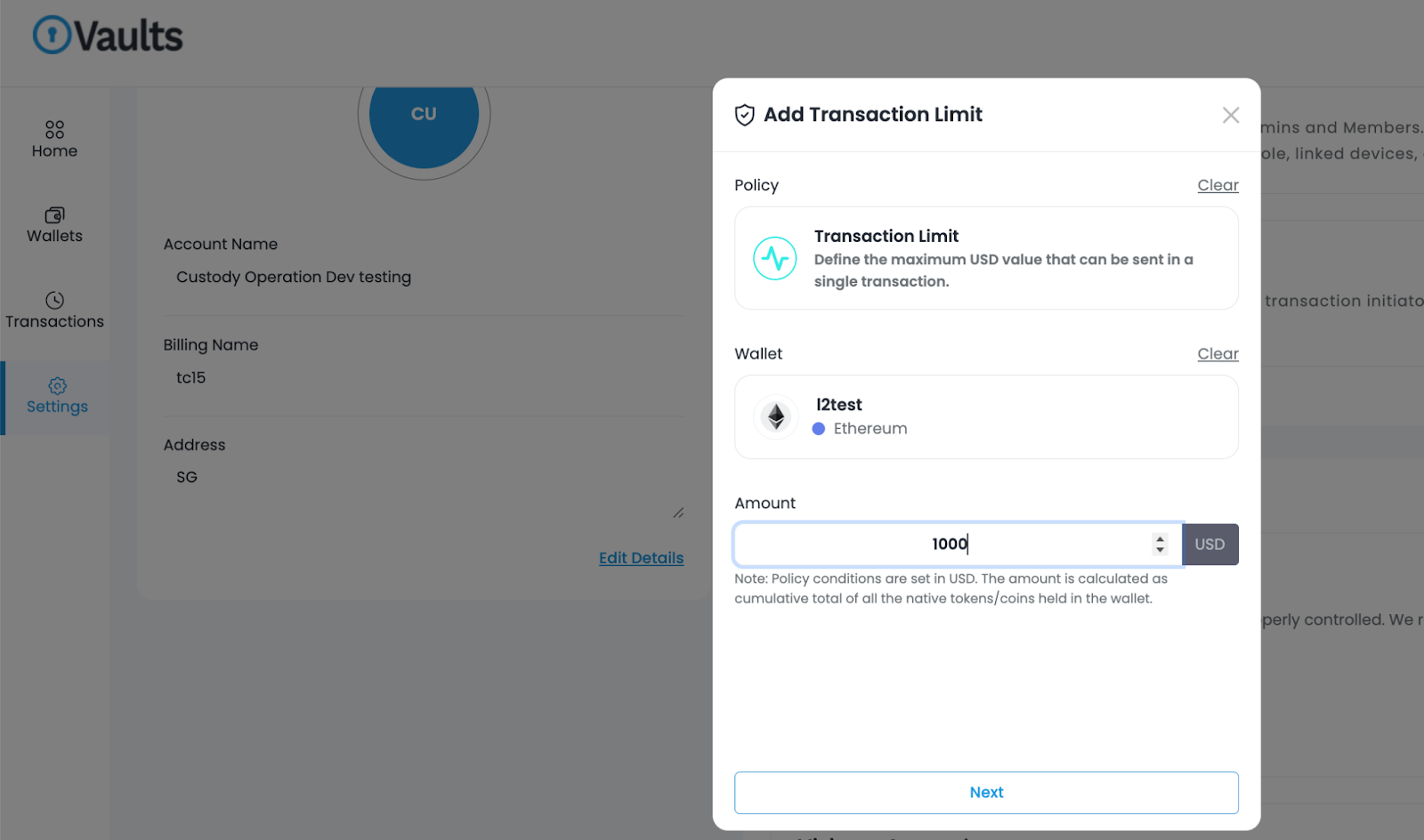
- In the policy creation window, select "Transaction Limit".
- Next, choose the specific wallet for which you want to establish the transaction limit.
- After selecting the wallet, the transaction limit configuration options will become visible.
- Within this configuration, simply enter the desired amount in USD that represents the cumulative total of tokens or coins that can be sent to whitelisted addresses for each individual transaction from the chosen wallet.
- Click on the "Next" button and proceed to approve.
- Once you click 'Approve', you'll be prompted to enter the 2FA code. After successful verification, the changes will be implemented.
By following these steps, you'll set transaction limits that align with your organization's financial guidelines, enhancing control and transparency over your policy management system. This feature offers a valuable layer of security and compliance to ensure responsible and efficient transactions to whitelisted addresses.
Was this article helpful?
That’s Great!
Thank you for your feedback
Sorry! We couldn't be helpful
Thank you for your feedback
Feedback sent
We appreciate your effort and will try to fix the article